Compile your asp.net mvc Razor views into a seperate dll

by Chris van de Steeg. 92 Comments

Inspired by David Ebbo’s blog post ‘Turn your Razor helpers into reusable libraries’ I wanted to be able to embed compiled Razor views in a dll. This would allow for easy distribution of asp.net mvc ‘modules’ that have their default views embedded, but allowing you to place files in your ‘views’ folder to override those default views.

To generate the c# code for the views, I just started out with David Ebbo’s single file generator and modified it to generate views instead of helpers only. To do this, there had to be a WebRazorHostFactory that knew about all the mvc stuff (what dll’s to reference, what namespaces to use, etc) .I could either choose to include all that information statically in the code, or I could look for a web.config in the same project and let the WebRazorHostFactory use that config. I chose the latter option, so that everyone can easily change the WebRazorHostFactory behavior  by adding a web.config file to their project.

Next, I started figuring out how the PageVirtualPathAttribute inside System.Web.Webpages.dll is used by Microsoft. I found out that it is used when you call ApplicationPart.Register and after that call, there’s not much you can use of this functionality without some heavy reflection. I know it’s the wrong path to choose, but did it anyway. I ended up creating a ViewEngine calling into ApplicationPart’s internal methods to output compiled views. It worked, but I didn’t like it much: there had to be a better way.

I then tried if I could hook into the BuildManager stuff that asp.net mvc uses to generate the views. It was actually much easier then expected, now why didn’t I go on that path the first time!

I ended up creating

  • a CompiledRazorBuildProvider, which inherits from the default RazorBuildProvider,
  • a CompiledVirtualPathProvider which returns a CompiledVirtualFile if it decides that a compiled view should be used
  • and a ApplicationPartRegistry, which registers which compiled views are available.

To view the source, head over to

To just get started without viewing the source, read on, I will explain step by step how to use this library with some screenshots.

If you have improvements, fork the project on GitHub and let me know! If you have suggestions for improvement, just drop it in the comments.

Step 1: Install the FileGenerator

Download and install the Visual Studio extension: http://visualstudiogallery.msdn.microsoft.com/en-us/f28290ce-d987-4f91-b034-707031e10ce6/file/39295/0/RazorSingleFileGenerator.vsix

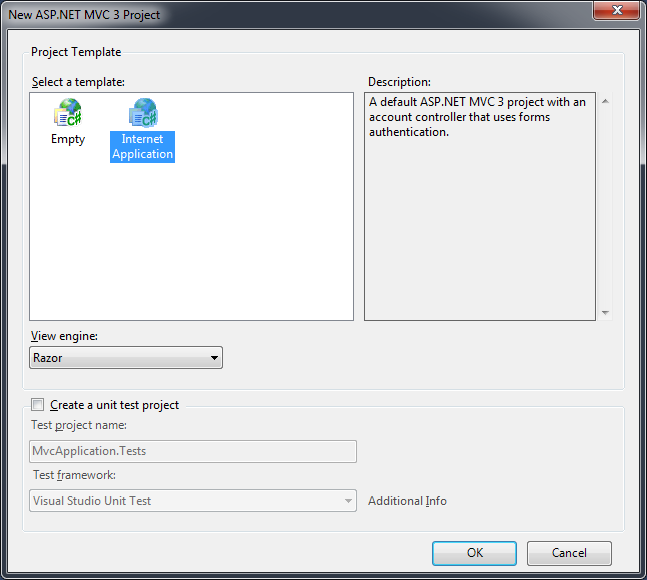
Step 2: Create new mvc project
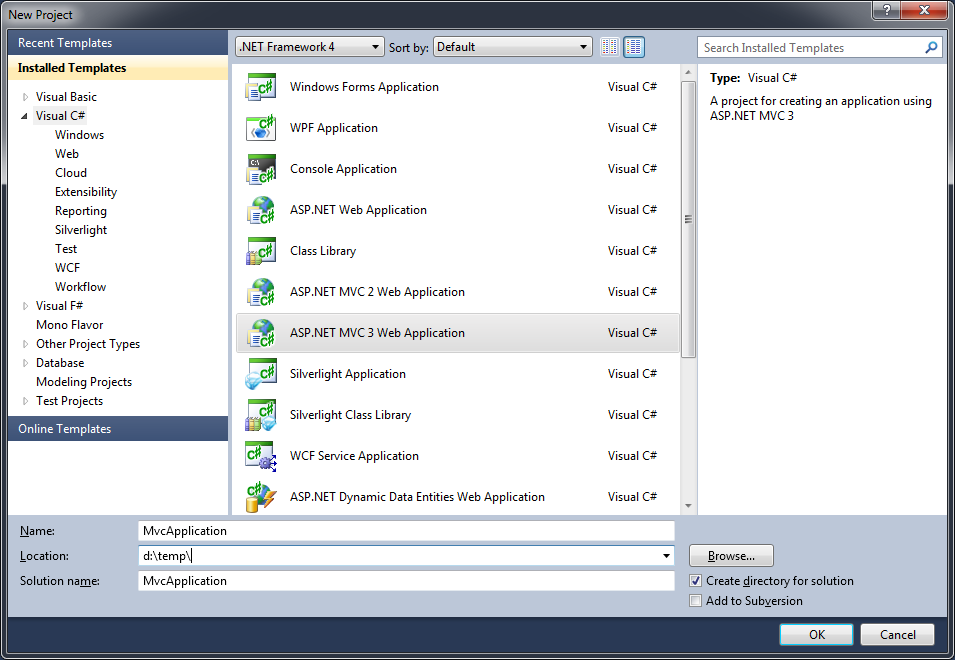
image

image

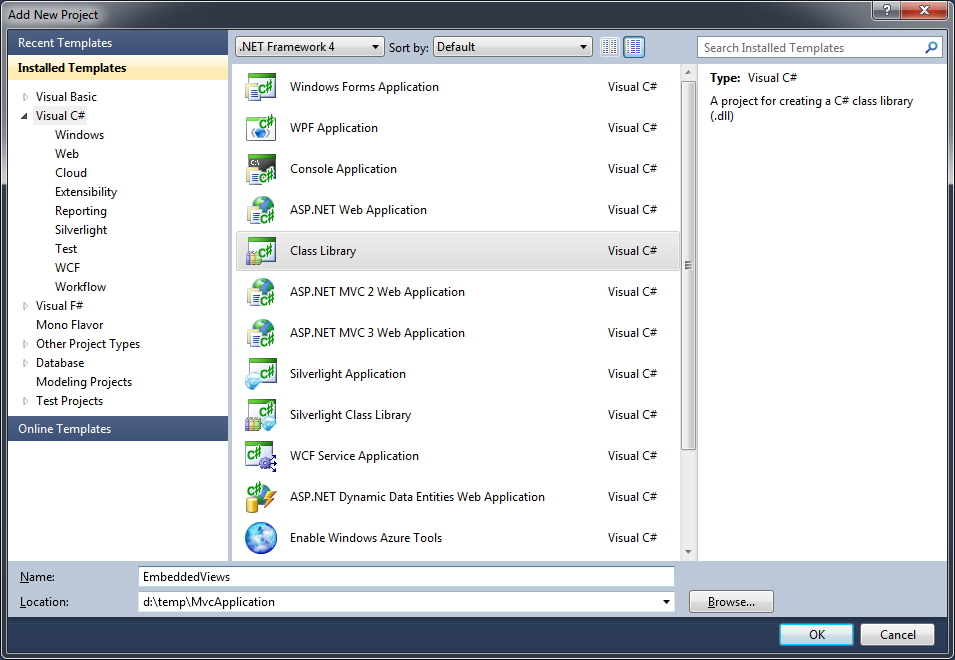
Step 3: Add a class library to hold the views
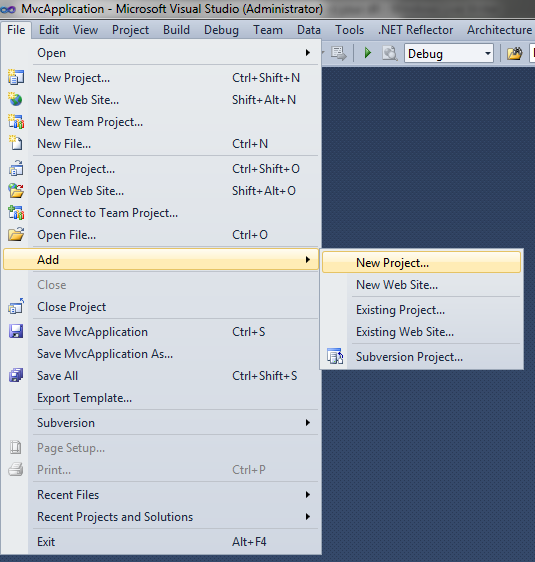
image

image

Step 4: Cut your Models & Views folders
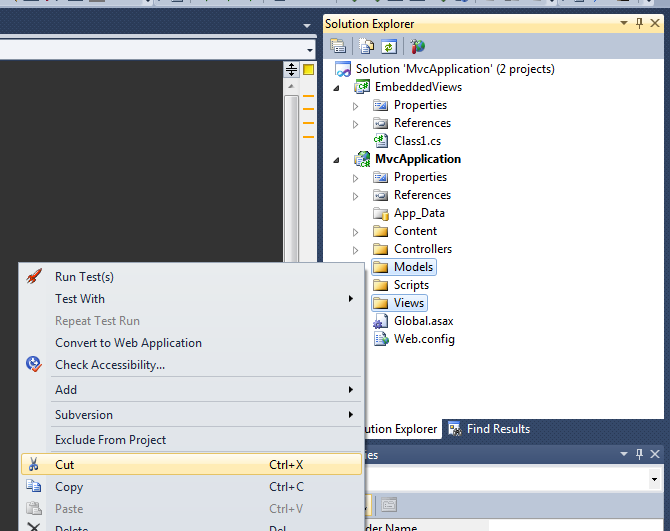
image

Step 5: Paste them into the just created Class Library
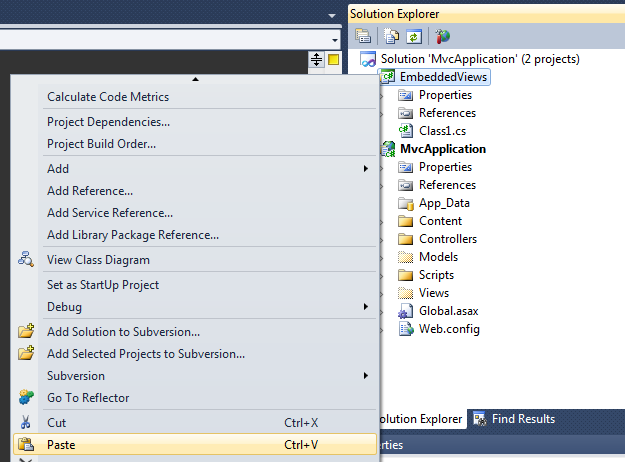
image

Step 6: Copy the website’s web.config file

image

Step 7: Paste that web.config file into the class library

image

Step 8: Select all your .cshtml files in the class library and set the Custom Tool to ‘MvcRazorClassGenerator’

Does anyone have a suggestion on improving this step??
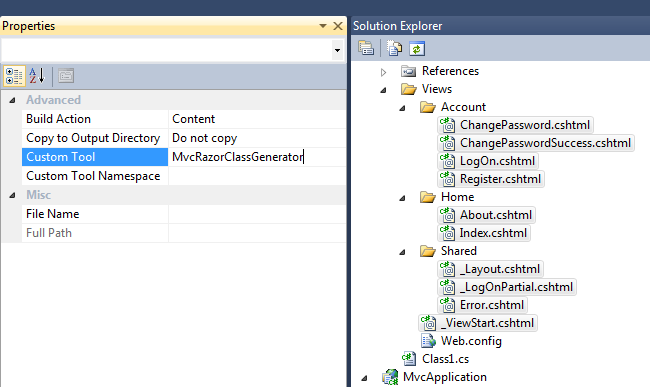
image

Step 9: Build your class library

Step 10: Add your class library to the references of the web application

image

image

Step 11: Add ‘Commons.web.mvc.precompiledviews.dll’ as a reference to your website

this dll is copied to the class library’s output folder (in this case ../EmbeddedViews/bin/debug’)

image

Step 12: Register your views by adding a line to the application_start in global.asax.cs

image

Step 13: Run your website!

Now, you will see the normal default website, even though there aren’t any views in your website path!

If you wish to override some views, just create the normal folders (eg /Views/Home) and add your views there, but don’t forget to copy back the deleted /Views/web.config back into your project then!

92 Responses to Compile your asp.net mvc Razor views into a seperate dll

  1. David Ebbo says:

    Very cool, Chris! I ran through all the steps and it worked perfectly.

    Ideally, we’d merge both projects into one that has both generators (helpers and views).

  2. Chris van de Steeg says:

    @David Ebbo: due to the fact that I use the same builder as mvc does, cshtml files in App_Code in your project will be compiled to HelperPages. What would your prefered method be?

    Placing your helpers in App_Code like in webprojects or setting a different CustomTool if you want a helper to be generated?

    I haven’t yet decided what I like more….

  3. David Ebbo says:

    Well, the helpers are meant to be used by views. So if the views get precompiled at build time, you can’t have the helpers they rely on be compiled at runtime from App_Code.

    Or am I misunderstanding you your question?

  4. Chris van de Steeg says:

    Yes, I think you misunderstood me :)

    If you create an App_Code folder in the assembly containing the precompiled views (the EmbeddedPreviews project in my screenshots), put your .cshtml helper files in there and set the CustomTool of those cshtml files to ‘MvcRazorClassGenerator’, the generated c# code will inherit from HelperPage. So, it works the same as in webprojects, plus you can precompile your Helpers that way.

    This is due to the fact that WebRazorHostFactory checks if the path starts with “App_Code” and if it does, it returns a WebCodeRazorHost instead of the default WebPagRazorHost

  5. David Ebbo says:

    Sorry, didn’t see this comment (not sure how to get notifications).

    Ok, I understand what you mean now. So it’s the choice between a single generator that does the right thing based on the path, and two different generators that ignore that path.

    Maybe one down side of relying on the folder to get Helper behavior is that you lose control over the namespace that your helpers end up in (or do you?). Also, some people might find it strange to have an App_Code in a library project.

    On the positive side, one generator might reduce confusion.

    If we had some nice item templates to create precompiled views & helpers, that might remove some pain.

  6. Chris van de Steeg says:

    @David seemed my blog had some problem sending out its email, hope it works now…

    I feel exactly the same, App_Code seems a little awkward in a library, but it’s handy that it’s only one custom tool you have to know about.

    I was thinking I could also check myself, if the folder-name contains Helpers/ to switch to your version of the code

    Could item templates have the CustomTool property set automatically… indeed that would be a nice option then

  7. rekna says:

    Is het possible to add the controllers for the embedded views as well to the library, to create a self contained package, so it would be possible to use it as some sort of component library ? I’m thinking about creating libraries that would encapsulate functionality that can be reused in different projects…

  8. Ted says:

    Wonderful tool, Chris! But I cannot get the Commons.web.mvc.precompiledviews.dll
    What could I be missing?

  9. Ted says:

    Hi, Chris, it’s me again

    1) There are no errors while building the library.
    2) Step 8: Setting the “CustomTool” property to “MvcRazorClassGenerator” did not work. I.e. it did not generate the *.cs code parts. So I set it to “RazorClassGenerator” as it was originally advised by David Ebbo and it worked immediately.
    However, Commons.web.mvc.precompiledviews.dll did not appears anywhere.
    3) I searched the web and found this:
    https://github.com/csteeg/BoC/tree/master/Src/Commons.Web.PrecompiledViews
    so I downloaded, built it and got the DLL in the references of my web app. OK so far.
    4) I am somewhat confused about moving (!) the entire “Model” folder to the separate library, moreover I have localized resources referenced in the models (data annotation messages etc). So I tried to:
    4.1) build without moving
    4.2) build with just copying the “Models”
    None of these worked, the result is error:

    The view ‘Index’ or its master was not found. The following locations were searched:
    ~/Views/Home/Index.aspx
    ~/Views/Home/Index.ascx

    5. In the Application_Start() I suspected I needed to register the embedded views library, so another thing I tried was to place this:
    BoC.Web.Mvc.PrecompiledViews.ApplicationPartRegistry.Register(typeof(PartialViewsDummyClass).Assembly);
    where “PartialViewsDummyClass” was an empty class in the classlibrary… (but without the views)

    I am definitly missing something.

  10. Ted says:

    Just to paste the entire web error (after running the application):

    Server Error in ‘/’ Application.
    ————————————-
    The view ‘Index’ or its master was not found. The following locations were searched:
    ~/Views/Home/Index.aspx
    ~/Views/Home/Index.ascx
    ~/Views/Shared/Index.aspx
    ~/Views/Shared/Index.ascx
    ~/Views/Home/Index.cshtml
    ~/Views/Home/Index.vbhtml
    ~/Views/Shared/Index.cshtml
    ~/Views/Shared/Index.vbhtml

  11. Chris van de Steeg says:

    @Ted could you
    1) try to manually trigger the customtool by right-clicking the file and select ‘Run custom tool’? If there are any errors, it should now give you a popup message.
    2) try the step-by-step example in this starting with a clean solution

  12. Ted says:

    Sorry for the delay…

    Well, there were two problems:
    1) Stupid me – I had messed up both tools – (yours: http://visualstudiogallery.msdn.microsoft.com/en-us/f28290ce-d987-4f91-b034-707031e10ce6 ) and (David Ebbo’s: http://visualstudiogallery.msdn.microsoft.com/en-us/1f6ec6ff-e89b-4c47-8e79-d2d68df894ec )
    This solved the puzzle around “RazorClassGenerator”/”MvcRazorClassGenerator” and the generated DLL Commons.web.mvc.precompiledviews.dll

    2) Second – I had to move the resources into another separate library project, plus some enumerations and custom data annotation attributes, used for decoration of models. And, yes, models have to be moved to the embedded views project as well.

    Finally everything works like a magic!
    Thanks Chris, nice tool :)

  13. yh says:

    Hi,

    Great work :) works like a charm….

    Minor question: Is it possible to load all the embedded views in single line of code at the application_start event?

    Thanks

  14. yh says:

    Hi,

    I thought I needed to register each view separately, I will move my models there and try it as you did.

    My bad

    Thanks

  15. Alxandr says:

    Emm. I just updated this tool today and now it don’t make .cs files of my .cshtml views anymore… So basically it’s stopped working for me which kinda sucks, cause I’m stuck in developement…

  16. Alxandr says:

    After restarting vs, uninstalling and reinstalling the extension (several times) it works again :-)

  17. Olmo says:

    Hi Chris,

    Congrats for your work. Works like a charm and is just what we needed.

    We are about to release the 2.0 version of our framework (Signum Framework) and we are planning to use you solution to embedd views on libraries. Could this be a problem? Of course we will give you authorship in the documentation.

    We are also trying to enable debuging in the cshtml and/or generated cs files but we feel a little bit lost.

    We have been taking a look to base RazorBuildProvider and somehow we would like to include the debug information in the pdb together with the CompiledVirtualFile.

    Can you give us some orientation on this?

    Kind regards

  18. Chris van de Steeg says:

    @Olmo, sure it’s fine to include the code in your framework! No problem.

    I just checked in a new version that doesn’t use the custom buildprovider. Instead, the virtualfile returns a cshtml-string @inheriting from the compiled razorview.
    Should solve some issues I had with the buildprovider and simplifies things.

    I still can’t debug the compiled types though… I’ll look into that. I don’t actually understand yet why that doesn’t work

  19. Olmo says:

    Hi again Chris.

    Clever hack! https://github.com/csteeg/BoC/blob/master/Src/Commons.Web.PrecompiledViews/CompiledVirtualFile.cs

    I will use Utf8 instead of ascii thought, it’s the default encoding that razor views uses.

    Hey! I just realized that maybe is cos of the #line hidden directive in the generated code. http://www.chrisvandesteeg.nl/wp-content/themes/01_green/images/submit-button.jpg

    If this works will enable debugging the generated code, this is ok for us so far.

    I try some hacks and i tell you.

  20. Tom Clarkson says:

    @Olmo – the #line hidden probably is the issue – in normal usage you don’t want to see the generated code. I’ll probably try a fix myself with a simple string replace when I get to a better connected pc.

    Being able to debug the cshtml rather than cshtml.cs would be nice though – #line filename should help at least as far as opening the right file to fix errors, but I’m not sure how it would be possible to get the right line numbers.

  21. DevWonder says:

    Hi man,
    awesome thing what you made, but i am facing one problem which is i cant use the one line to register all Embedded Views like you mentioned.

    i tried this in Global.ascx in host application
    ApplicationPartRegistry.Register(this.GetType().Assembly);

    but i get this error
    The view ‘Custom’ or its master was not found or no view engine supports the searched locations. The following locations were searched:
    ~/Views/Test/EmbeddedTest.aspx
    ~/Views/Test/EmbeddedTest.ascx
    ~/Views/Shared/EmbeddedTest.aspx
    ~/Views/Shared/EmbeddedTest.ascx
    ~/Views/Test/EmbeddedTest.cshtml
    ~/Views/Test/EmbeddedTest.vbhtml
    ~/Views/Shared/EmbeddedTest.cshtml
    ~/Views/Shared/EmbeddedTest.vbhtml

  22. Chris van de Steeg says:

    @DevWonder: you need to register the Assembly containing the views. In your case, you could register your views by changing

    ApplicationPartRegistry.Register(this.GetType().Assembly)

    to

    ApplicationPartRegistry.Register(typeof(TestController).Assembly)

  23. DevWonder says:

    Man You are amazing, it works perfectly now :)
    but if you don’t mind me asking, what if i have multiple Modules inside this Plugins Project, Like Blog, NewsLetter, in Folder Structure like Areas
    Plugins Project
    |–Blog
    |-BlogController
    |-BlogEditController
    |–NewsLetter
    |-NewsLetterController
    |-NewsLetterEditController

    is there a way to register them all?

    another thing is, now i cant reference Declarative Helpers like i used to with David Version, am i missing something ?

    totally appreciate your time and response.

  24. Chris van de Steeg says:

    @DevWonder, every view in your assembly will be registered. If you have multiple assemblies, you can just call ApplicationPartRegistry.Register for each of those assemblies.

    You can only access Declarative Helpers if they are compiled as well. So if you add a App_Code folder to your plugins project, and set the helpers in there to be compiled just like your other views, you can use them.

  25. DevWonder says:

    Chris thanks a lot again, you are right i just have to register one Controllers and the rest will work.

    but now i have got a new problem, if i create an Areas like structure like
    Plugins Project
    |–BlogModule
    |-Controllers
    |-BlogController
    |-BlogEditController
    |-Views
    |-Index
    |-BlogEdit
    |–-NewsLetterModule
    |-Controllers
    |-NewsLetterController
    |-NewsLetterEditController
    |-Views
    |-Index
    |-NewsLetterEdit

    i get 404 error.

    now i have create arearegisteration class in hte blog Blog folder with following route
    context.MapRoute(“Blog_Default”, “One”, new { controller = “Blog”, action = “Index” });

    so i assume this is not supported, or i am still doing something stupid :)

    regarding the HTML Helpers, please correct me if i am wrong,what you meant is that your extension only support helpers if they are in App_Code Folder and set Build Action to Compile, unlike David one where you can put them anywhere and set build Action to none?

    if this is the case, can i use yours for embedded views and David Extension for declarative helpers or installing them both will create a conflict ?

    again my Extreme appreciation for your quick response and patience.

  26. Chris van de Steeg says:

    @DevWonder working with area’s should be supported. Let me look into that.

    You’re right about the HTML Helpers : I’m using exact the same technique to compile cshtml files as the aspnet_compiler does. So however you create your helpers in a normal mvc project, you can do the same here. As long as you set them to compile

  27. DevWonder says:

    thanks alot man for your input, i hope your tests prove that Areas Work, specially if i have created custom view Engine to locate Views in none standard MVC folder structure.

  28. veera says:

    Hi Chris,
    The custom tool is awesome.
    I wanted to access all the MVC3 Templates within the new View Class Library Project.
    Is there any way of porting the T4 templates to this class library.
    Sorry if this is not within the context of this biog post.

  29. veera says:

    Hi Chris,
    I am not able to add a new cshtml files to the project. I lost the options that the Visual studio provides to add views(from existing templates) to the class library. I just want to check if the problem is because the mvc3 templates are available only on a mvc web project.
    Is there a way of creating new razor files from visual studio on the class library project?
    Sorry if iam not clear.

  30. Chris van de Steeg says:

    @veera, indeed, cshtml files can only be added to a mvc webproject.
    You can however use the Custom BuildTool in an mvc webproject also if you’d like.

    Otherwise, you just have to place a .cshtml ‘by hand’ in your class library (but you can’t use the t4 templates then indeed)

  31. Miguel says:

    Hi Chris,

    This is great. There’re a couple of projects where we will start to use this. Just a few questions.
    -How far did you get with the PDB request?
    -What’s the license?
    -Could we just take the code of PrecompiledViews and merge it with our own Views dll? I was thinking of ILMerge, but it might be better for us to just hack this and make this the default behavior (making all those classes internal). I want to avoid the dependency on a second assembly.
    - Did you agree on something with Dave? We’re thinking of using both approaches and I agree with the initial comments that it would be nice to have only one generator.

    Cheers. Great job.

    Miguel

  32. Miguel Madero says:

    Hi Chris,

    I don’t see my previous posts. I’m not sure if there was an error when posting. Anyway, amongst other things I was suggesting to merge both tools and add support for Debug Symbols. I sent you a pull request with both changes.
    https://github.com/csteeg/BoC/pull/1

    Please let me know if you have any questions.

    Regards,
    Miguel

Leave a Reply

Your email address will not be published. Required fields are marked *

*

You may use these HTML tags and attributes: <a href="" title=""> <abbr title=""> <acronym title=""> <b> <blockquote cite=""> <cite> <code> <del datetime=""> <em> <i> <q cite=""> <strike> <strong>