Compile your asp.net mvc Razor views into a seperate dll

by Chris van de Steeg. 91 Comments

Inspired by David Ebbo’s blog post ‘Turn your Razor helpers into reusable libraries’ I wanted to be able to embed compiled Razor views in a dll. This would allow for easy distribution of asp.net mvc ‘modules’ that have their default views embedded, but allowing you to place files in your ‘views’ folder to override those default views.

To generate the c# code for the views, I just started out with David Ebbo’s single file generator and modified it to generate views instead of helpers only. To do this, there had to be a WebRazorHostFactory that knew about all the mvc stuff (what dll’s to reference, what namespaces to use, etc) .I could either choose to include all that information statically in the code, or I could look for a web.config in the same project and let the WebRazorHostFactory use that config. I chose the latter option, so that everyone can easily change the WebRazorHostFactory behavior  by adding a web.config file to their project.

Next, I started figuring out how the PageVirtualPathAttribute inside System.Web.Webpages.dll is used by Microsoft. I found out that it is used when you call ApplicationPart.Register and after that call, there’s not much you can use of this functionality without some heavy reflection. I know it’s the wrong path to choose, but did it anyway. I ended up creating a ViewEngine calling into ApplicationPart’s internal methods to output compiled views. It worked, but I didn’t like it much: there had to be a better way.

I then tried if I could hook into the BuildManager stuff that asp.net mvc uses to generate the views. It was actually much easier then expected, now why didn’t I go on that path the first time!

I ended up creating

  • a CompiledRazorBuildProvider, which inherits from the default RazorBuildProvider,
  • a CompiledVirtualPathProvider which returns a CompiledVirtualFile if it decides that a compiled view should be used
  • and a ApplicationPartRegistry, which registers which compiled views are available.

To view the source, head over to

To just get started without viewing the source, read on, I will explain step by step how to use this library with some screenshots.

If you have improvements, fork the project on GitHub and let me know! If you have suggestions for improvement, just drop it in the comments.

Step 1: Install the FileGenerator

Download and install the Visual Studio extension: http://visualstudiogallery.msdn.microsoft.com/en-us/f28290ce-d987-4f91-b034-707031e10ce6/file/39295/0/RazorSingleFileGenerator.vsix

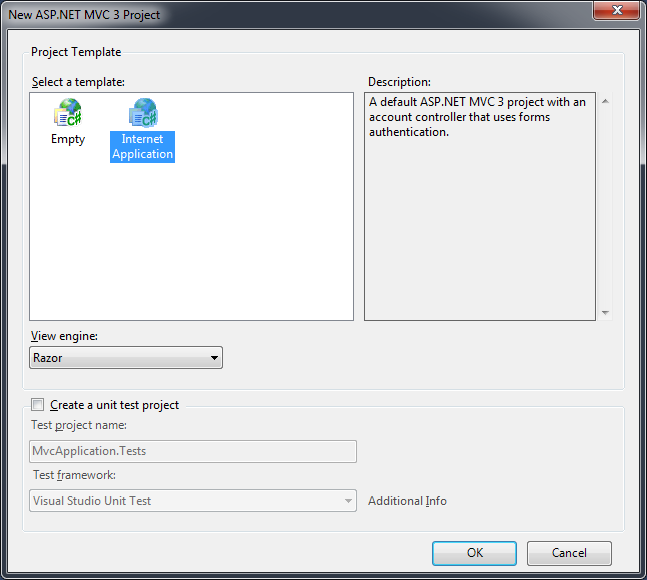
Step 2: Create new mvc project
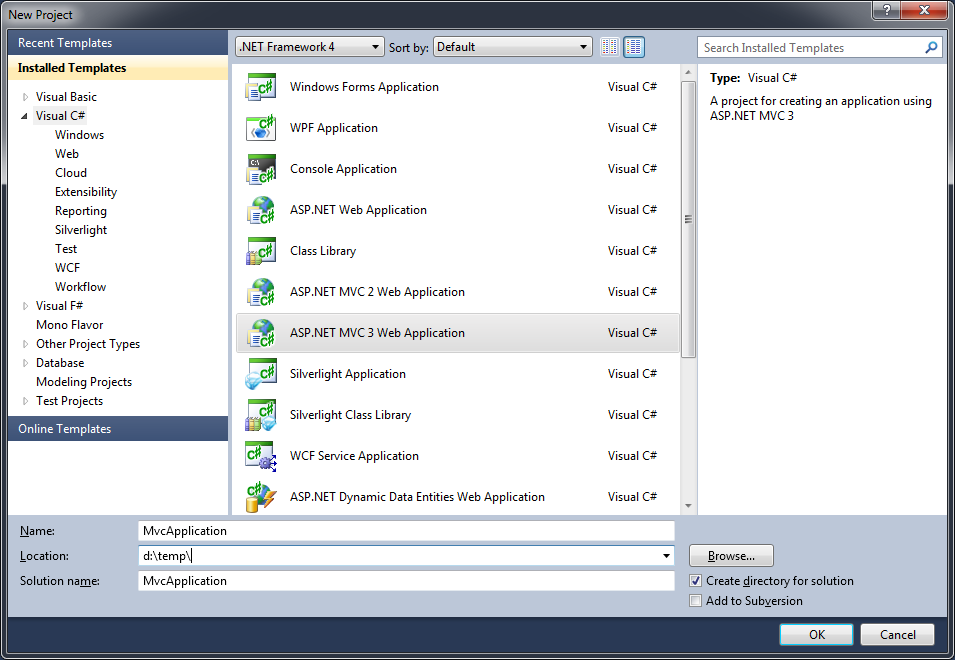
image

image

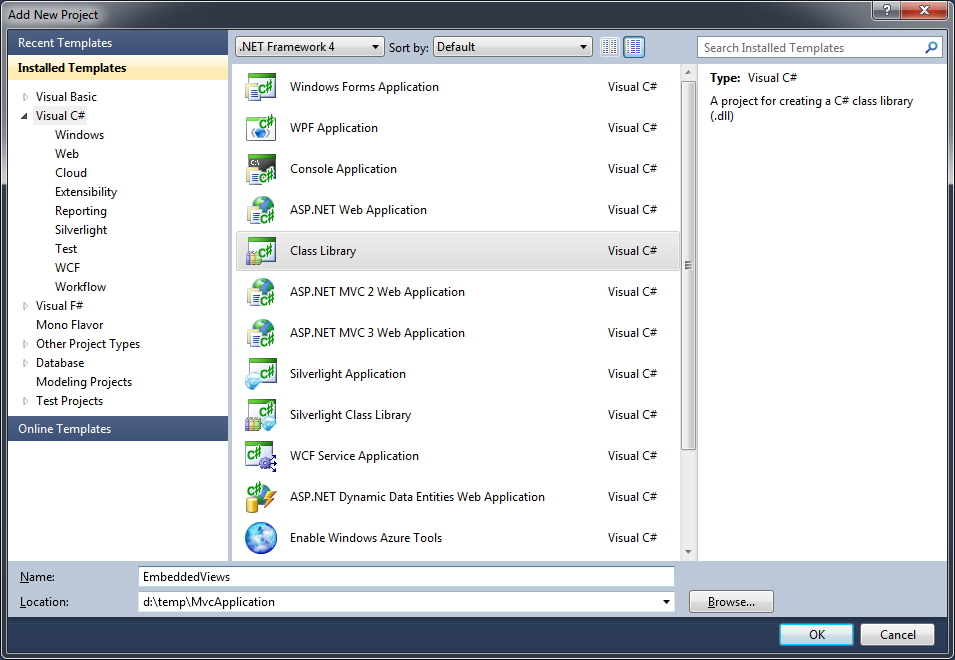
Step 3: Add a class library to hold the views
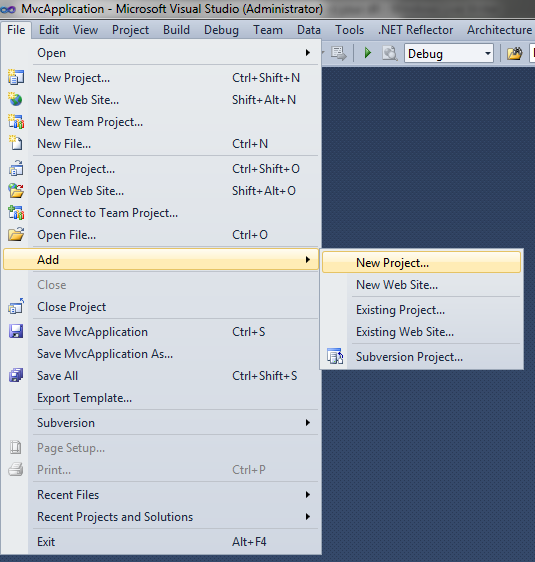
image

image

Step 4: Cut your Models & Views folders
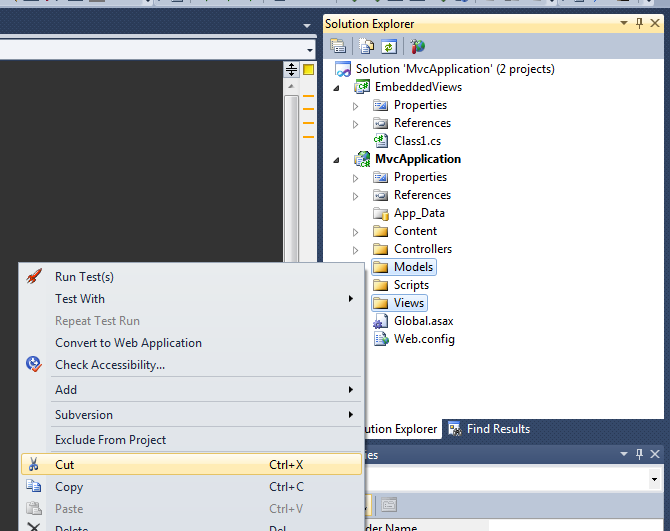
image

Step 5: Paste them into the just created Class Library
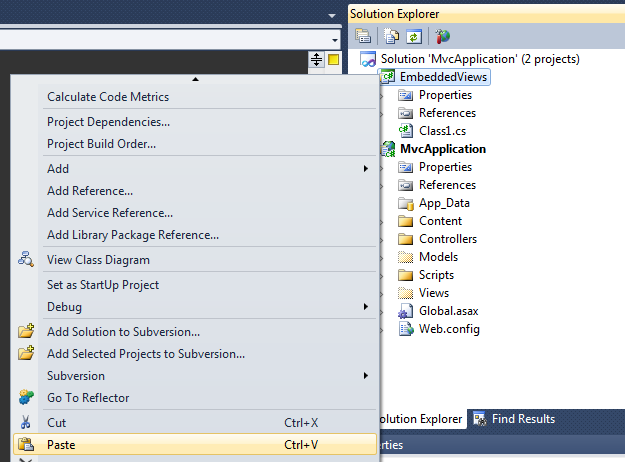
image

Step 6: Copy the website’s web.config file

image

Step 7: Paste that web.config file into the class library

image

Step 8: Select all your .cshtml files in the class library and set the Custom Tool to ‘MvcRazorClassGenerator’

Does anyone have a suggestion on improving this step??
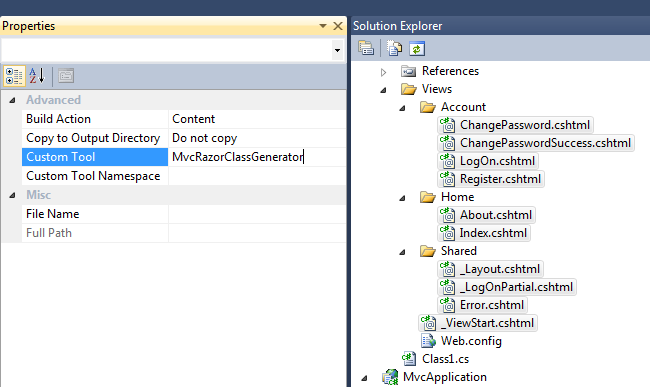
image

Step 9: Build your class library

Step 10: Add your class library to the references of the web application

image

image

Step 11: Add ‘Commons.web.mvc.precompiledviews.dll’ as a reference to your website

this dll is copied to the class library’s output folder (in this case ../EmbeddedViews/bin/debug’)

image

Step 12: Register your views by adding a line to the application_start in global.asax.cs

image

Step 13: Run your website!

Now, you will see the normal default website, even though there aren’t any views in your website path!

If you wish to override some views, just create the normal folders (eg /Views/Home) and add your views there, but don’t forget to copy back the deleted /Views/web.config back into your project then!

91 Responses to Compile your asp.net mvc Razor views into a seperate dll

  1. Miguel Madero says:

    Excellent. Thanks. I hope you enjoyed the skiing :)

    Would you agree on merging the PrecompiledViews dll? What do you think? I’ll have a go at it later today.

  2. Miguel Madero says:

    BTW, I noticed the one in the VS Gallery is still not updated… Not in a rush since we’re using the one from my fork ATM, but just wanted to let you know.

  3. Aurelien Sudre says:

    Hi,
    Excellent work, very useful for making modular mvc apps.
    But i got something wrong when i try to use your tool…
    I got namespaces problems :
    “The type or namespace name ‘Views’ could not be found (are you missing a using directive or an assembly reference?)”

    at this point :
    public class _Page_Areas_Blog_Views_Blog_Index_cshtml : Views.Blog._Page_Blog_Views_Blog_Index_cshtml {

    It seems the compiled file is under namespace ASP, instead of being under my library’s one.

    Maybe I do something wrong, but what ?

  4. gabe says:

    I have followed your steps and everything works until I try to build the web application project. I am getting: “Assembly generation failed — Referenced assembly ‘Commons.Web.Mvc.PrecompiledViews’ does not have a strong name.” My projects have a strong name key. Any suggestions?

    thx,
    gabe

  5. George says:

    Very nice, thanks for sharing.
    Just have to issues:
    1) When moved the views to another project (as suggested), the debugging of views stopped going through the razor code.
    2) Because I am using the Resharper utility, the controller stopped identifying the views, although its not complaining, its only marking the view name in red.

    Thanks again.

  6. Gabe says:

    This works great!!! Just one questions though, how can I get intellisense to work for the Views in my Class Library?
    For instance, it’s complaining ViewBag is not in the current context. Is there any way to fix that?

  7. Dewy says:

    Hi Chris,

    Is the debugging supported now? And does this mean that you can debug in the original helper file rather than the compiled version?

    Cheers
    Dewy

  8. Sam says:

    I ran through your steps, and I ran into a couple of tricky issues. Here is a quick FAQ from my experience with the initial setup:

    Q: What does the Custom Tool, “MvcRazorClassGenerator”, do?
    A: When it is applied to the “Custom Tool” property for all the views (*.cshtml), it adds a *.cs file to the view. Basically, it converts the view into code-behind, so it can be generated into a DLL.

    Q: I keep getting an error like this:
    The view ‘Index’ or its master was not found or no view engine supports the searched locations. The following locations were searched:
    ~/Views/Home/Index.aspx
    ~/Views/Home/Index.ascx
    ~/Views/Shared/Index.aspx
    ~/Views/Shared/Index.ascx
    ~/Views/Home/Index.cshtml
    ~/Views/Home/Index.vbhtml
    ~/Views/Shared/Index.cshtml
    ~/Views/Shared/Index.vbhtml

    What do I do?
    A: The compiler is telling you that it doesn’t know where to look for the view(s). You probably aren’t referencing the correct Project (Assembly).

    To fix this issue:
    1. Add a placeholder CS file in the embedded view project, e.g. “Class1.cs”.
    2. In your Global.asax file in your general project, add:
    BoC.Web.Mvc.PrecompiledViews.ApplicationPartRegistry.Register(typeof([YOUR_FULL_EMBEDDED_VIEW_PATH].Class1).Assembly);

    where [YOUR_FULL_EMBEDDED_VIEW_PATH] is the complete path to access your Class1.cs file (you could just type in Class1.cs, and press Control + “.”).

    3. Run your application, and it should work!

  9. shawn says:

    Hi Chris

    How about use embedded resource to store the views in assembly. just like MVCContrib PortableArea functionality.

  10. J.P. says:

    Hi Chris,

    I’m having an issue when I use @Html.RenderAction or Html.RenderPartial.
    The tool generates “Write(Html.RenderAction(actionName, object routeValue));”.
    And of course this doesn’t compile as Html.RenderAction returns void.

    Really cool stuff otherwise thanks!
    JP

  11. Samuel Béliveau says:

    First, thanks for providing this useful library ! :)

    On my side, instead of directly referencing the class library, I would like to load assemblies at runtime (for a plugin system). I use BuildManager.AddReferencedAssembly(assembly) in PreApplicationStartMethod and it seems to resolve correctly the controller. However, your library no longer seems to resolve the View.

    Interestingly, the first query of “locahost:12345/Query”, DictionaryBasedApplicationPartRegistry.GetCompiledType will correctly ask for “~/Views/Plugin/Index.cshtml” and return the instance. The following queries however won’t look for this one, but instead paths like “~/Plugin/Index.cshtml” or “~/Views/Plugin/Index.vbhtml”.

    Got any idea ? :)

    Thanks !

  12. Samuel Béliveau says:

    Oops, I made a typo in my last comment, it should read:

    Interestingly, when the first query “locahost:12345/Plugin” triggers, [...]

  13. makit says:

    Is there any vbhtml support? I have tried and can’t get it to work for vbhtml and I have to use VB at my workplace so can’t use c#.

  14. valamas says:

    Thank you to Sam (May 11, 2011) for the suggestion of ApplicationPartRegistry.Register(typeof(ClassLibrary1.Class1).Assembly);

  15. valamas says:

    TIP: Want that right-click, Add View menu item in your class library?
    Edit csproj file for the web app. Copy the ProjectTypeGuids line. Paste this into your classlib csproj file.

  16. valamas says:

    I just wanted to add. Recommend trying the second project as another MVC project instead of a class library. I will refer to these as MvcMain and MvcClasslib for reference.

    I was finding that when a view had an error, that the error line was line 0 in MvcMain. Now given the ability to run the second MvcClassLib project directly gives a specific error. It is the best of both worlds because the compiling of MvcClassLib views prevents syntax errors.

    You just have to make sure you have Web.Config in both places. I made my MvcMain global.asax inherit from MvcClassLib global.asax.

    (This means my previous tip of having your class library act like an MvcProject template is no longer needed).

    ~Good luck

  17. Raja Kolli says:

    @Chris, First of all thank you very much for this excellent utility. I am not sure why something as basic like this does not come out of the box.

    Hey Veera/Chris, what approach did you guys finally decide on…
    the question being
    “…
    veera says:
    Feb 16, 2011
    Hi Chris,
    I am not able to add a new cshtml files to the project. I lost the options that the Visual studio provides to add views(from existing templates) to the class library. I just want to check if the problem is because the mvc3 templates are available only on a mvc web project.
    Is there a way of creating new razor files from visual studio on the class library project?
    Sorry if iam not clear.

    Chris van de Steeg says:
    Feb 16, 2011
    @veera, indeed, cshtml files can only be added to a mvc webproject.
    You can however use the Custom BuildTool in an mvc webproject also if you’d like.
    Otherwise, you just have to place a .cshtml ‘by hand’ in your class library (but you can’t use the t4 templates then indeed)

    I want to know what/how the developer community is using the seperate class library approach.
    How are people using scaffolding templates?
    How do people define a view as a partial view?
    How are you doing “Add View” and “Add Controller” functionality that are some of the core MVC 3 core concepts.

    I am sorry is some of my questions are lame or redundant. Please feel free to answer few or all questions.
    Thank you once again.

  18. Tom Schreck says:

    Hi Chris. Thank you very much for this tool. It looks very promising. I have some common tables that are used in multiple projects. I think I can use this approach to provide customization to the common tables as needed (I hope). I’m still feeling my way through this.

    How does this compare to MVC3′s Areas and MvcContrib’s Portable Areas? With Areas you have to register the area for routing purposes. Are there any routing concerns with your approach? I tried creating the same Controller in the embeded project and the web app and got an error saying the same controller name exists in 2 locations and it suggested using Are registration.

    I created a controller in the embeded project and was able to navigate to it. The parent web app had no knowledge of the controller. Pretty cool.

    Thanks

    Tom

  19. Morgan says:

    @Chris:

    Would you kindly inform us whether this tool is still needed, given the latest version of T4MVC?

    It seems that they now overlap quite significantly. Which is currently (July 2011) the preferred tool for use? I don’t quite understand what the difference is between them anymore.

    Otherwise, great tool! Helped me alot for older projects! :-)

  20. Morgan says:

    Meant to say in my last post, not really T4MVC, but Ebbo’s “Razor Single File Generator”.

  21. Parminder says:

    Hi Chris,

    Really nice work. Have a look here http://fzysqr.com/2010/09/10/asp-net-mvc2-plugin-architecture-tutorial-part-3/
    I liked that approach because that doesnt require to generate any cs file. but that works good with WebViewengine and not with cshtml files, specially if you are passing a model to the view. Can we achieve same result without generating cs file.

    Also, I wana do some serious work with your library. Should I do it or its just for learning purpose. Is there any other solution if you can suggest.

    Regards
    Parminder

  22. Parminder says:

    Playing, Playing, Playing.

    Hi Chris,

    One more issue here. I created two plugins (Home and Users) and have HomeController and Index method in both. I managed to register route using namespace like this.
    public static void RegisterRoutes(RouteCollection routes)
    {
    routes.IgnoreRoute(“{resource}.axd/{*pathInfo}”);

    routes.MapRoute(
    “Default”, // Route name
    “Home”, // URL with parameters
    new { controller = “Home”, action = “Index”, id = UrlParameter.Optional }, new[] { “Dha.Plugin.Home.Controllers” }
    );

    routes.MapRoute(
    “Users”, // Route name
    “users”, // URL with parameters
    new { controller = “Home”, action = “Index”, id = UrlParameter.Optional }, new[] { “Plugin.Users.Controllers” }
    );

    routes.MapRoute(
    “Users-justatest”, // Route name
    “users/justatest”, // URL with parameters
    new { controller = “Home”, action = “justatest”, id = UrlParameter.Optional }, new[] { “Plugin.Users.Controllers” }
    );

    }

    It works well, but returns me index view from Users moudule even when I am accessing the home url (http://site/home). I think it should look for the view the same assembly where the controller is being called.

    Help will be appreciated.

    Regards
    Parminder

  23. Herb says:

    I have set up a working demo where I have 3 external class libraries. 1 has the top level views as you describe here, and the other 2 are where I put the area code in its entirety.

    Everything works great.

    However, I did not copy over the main web.config from my main project to these libraries and things are still good. Why exactly do I need that Web.config to be copied over to my class library?

    I did not do your step 6 and step 7.

  24. Dom says:

    Hi, great work on this btw, i’m loving it. So, i have my solution running and building however i need to install the RazorGenerator onto a build server, so ideally into the GAC. For some reason it’s not copying to the GAC though (no errors). What is the best way to reference the Generator for build servers (obviously i don’t want to version my bin folder or create a dependencies folder just for one assembly). Any help will be greatly appreciated. Cheers, Dom

  25. Marijn says:

    Hi Chris,

    Excellent article!
    I’ve just implemented this into a new MVC3 framework I’m using for all custom web applications. It’s just what I was looking for!

    Many thanks!

    Regards
    Marijn

  26. António Albuquerque says:

    Hi.

    I’m trying to use the precompiled views in a project similar with a CMS.

    Instead of adding the Assembly to the main mvc web project, I load the assembly with reflection in the Application_Start() method and then register using BoC.Web.Mvc.PrecompiledViews.ApplicationPartRegistry.Register().

    All works fine until I try to open a page and I get an error like: An unexpected exception occurred while binding a dynamic operation and it points to the generated .cs of the page I’m trying to open.

    Any ideas?

    Thanks

  27. Nathan Pledger says:

    This is awesome. Thanks.

    I’m looking at using it for Partial Views, however, which I am thinking is not going to work as I get an error when compiling within the Execute() override method: “THe name ‘model’ does not exist in the current context”

    [System.CodeDom.Compiler.GeneratedCodeAttribute("MvcRazorClassGenerator", "1.0")]
    [System.Web.WebPages.PageVirtualPathAttribute("~/Views/CurrentLivePolicyCountParams.cshtml")]
    public class _Page_Views_CurrentLivePolicyCountParams_cshtml : System.Web.Mvc.WebViewPage
    {
    #line hidden

    public _Page_Views_CurrentLivePolicyCountParams_cshtml()
    {
    }
    protected System.Web.HttpApplication ApplicationInstance
    {
    get
    {
    return ((System.Web.HttpApplication)(Context.ApplicationInstance));
    }
    }
    public override void Execute()
    {

    Write(model); // <– ERROR position

    WriteLiteral(" Mis.Reports.Models.CurrentLivePolicyCountReportModel\r\n\r\nHell” +
    “o”);

    }
    }
    }

Leave a Reply

Your email address will not be published. Required fields are marked *

*

You may use these HTML tags and attributes: <a href="" title=""> <abbr title=""> <acronym title=""> <b> <blockquote cite=""> <cite> <code> <del datetime=""> <em> <i> <q cite=""> <strike> <strong>